Choosing a school backpack with laptop compartment is not simply a matter of finding the largest bag or the biggest discount. The right backpack should fit the student, protect the device, organize everyday supplies and remain comfortable when fully packed. A bag can look practical online and still become frustrating after a week of commuting, crowded hallways or long walks across campus.
Back-to-school shopping has started unusually early in 2026, with backpacks and electronics already receiving strong attention. That makes it useful to know which features genuinely matter before a limited-time offer creates pressure to buy too quickly.
Start With the Laptop, Not the Backpack
The first measurement to check is the laptop’s actual size. A product listing may say that a backpack fits a 15-inch or 16-inch laptop, but screen size alone does not tell you the full width, depth and thickness of the device.
Measure the closed laptop and compare those dimensions with the manufacturer’s internal sleeve measurements. Leave a small amount of room so the device can slide in easily, but avoid a compartment that is so loose that the laptop moves around while walking.
A well-fitted sleeve should hold the device upright without forcing the zipper or pressing hard against the laptop’s corners. Students who use a protective laptop case should measure the laptop while it is inside that case. A durable school backpack with laptop compartment can also work for college, commuting and occasional travel when the overall size remains practical.
Look for Real Laptop Protection
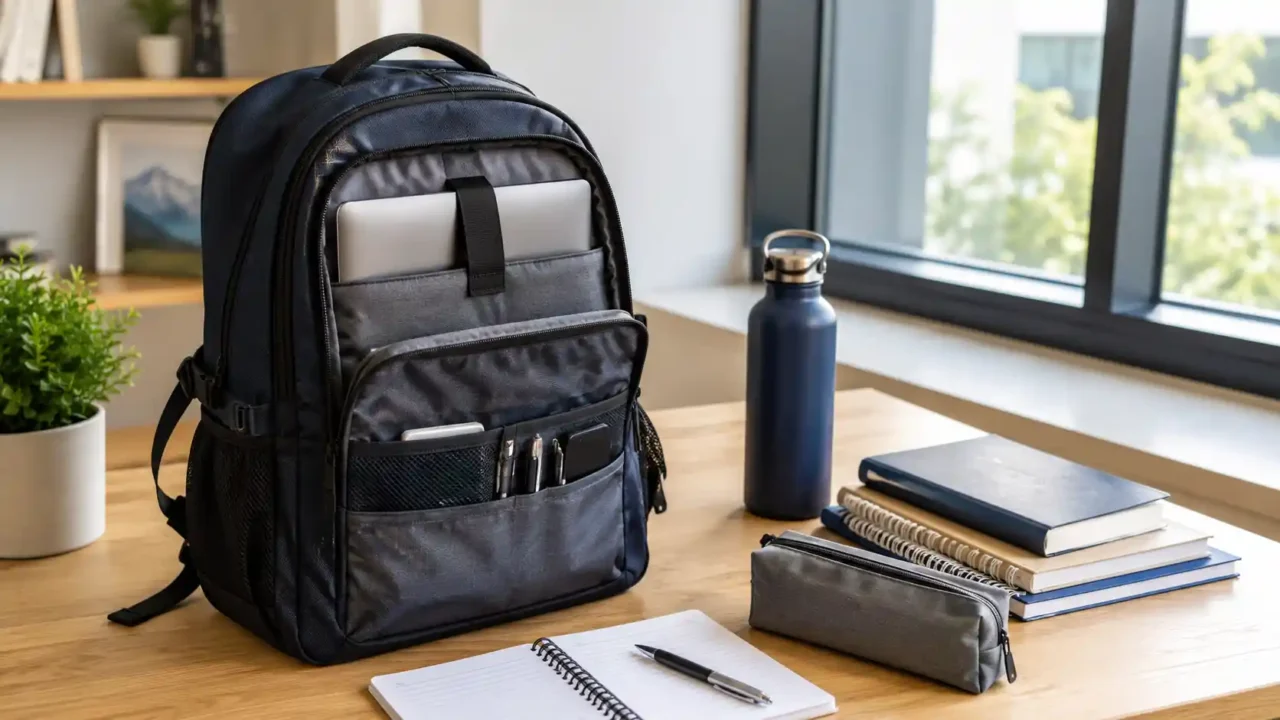
A laptop compartment should offer more than a thin divider between the device and the main storage area. Useful protection usually includes:
- padding on both sides of the compartment;
- a padded or reinforced bottom;
- a secure strap, zipper or snug sleeve opening;
- separation from water bottles, food and loose stationery;
- enough structure to prevent books from pressing directly against the screen.
One of the most useful details is a raised or suspended laptop sleeve. This creates a small gap between the device and the bottom of the backpack, reducing the chance of a hard impact when the bag is placed on the floor.
Do not assume that the word “padded” guarantees strong protection. Product photos, customer images and return-policy details can reveal more than a vague feature list.
Choose the Right Capacity for Daily Use
Bigger is not automatically better. An oversized backpack encourages overpacking, takes up more space and may feel unbalanced when only partly filled.
For everyday school or college use, think about what the student will actually carry:
- laptop or tablet;
- charger and cable;
- notebooks or folders;
- one or two textbooks;
- pencil case;
- water bottle;
- lunch or snacks;
- headphones and small personal items.
A student carrying sports equipment, art supplies or several large books may need more capacity than someone who mainly uses digital materials. The goal is to find enough room for a normal day without turning the backpack into luggage. The best school backpack with laptop compartment balances device protection, comfortable straps and enough room for everyday school supplies.
Families preparing several school essentials may also want to compare the bag layout with a practical kids lunch box for school so food containers do not compete with the laptop for space.
Comfort Matters More After the Backpack Is Full
A backpack that feels light in a store can become uncomfortable once a laptop, charger, books and water bottle are added.
Look for two wide, padded shoulder straps that can be adjusted evenly. A padded back panel can improve comfort, while breathable mesh may help during warm commutes. The backpack should sit close to the back rather than hanging low and pulling backward.
For younger students, the overall dimensions should match the student’s frame. For older students and commuters, a sternum strap can help stabilize the bag during longer walks, cycling or public transport.
Test the backpack with realistic weight whenever possible. Check whether the straps dig into the shoulders, the bottom presses against the lower back or the bag leans noticeably to one side.
Organization Should Reduce Friction, Not Add Pockets
More pockets do not always create better organization. A practical layout makes frequently used items easy to reach without forcing the student to open every compartment.
Useful organization may include:
- a separate laptop section;
- a main compartment for books and folders;
- a smaller front pocket for chargers, pens and keys;
- at least one secure interior pocket;
- an external water-bottle pocket;
- a quick-access pocket for a transit card or phone.
The main compartment should open wide enough to see what is inside. Very deep, narrow bags can hide small items at the bottom and make daily packing more difficult.
Students building a complete study setup can coordinate the backpack with useful laptop accessories for a desk setup instead of carrying unnecessary accessories every day.
Check Materials, Stitching and Zippers
A school backpack is opened, closed, placed on floors and carried through changing weather almost every day. Durability therefore depends on more than the outer fabric.
Inspect the stitching around the shoulder straps, grab handle and base. These areas carry the most stress. Reinforced seams and strong zipper tracks are more important than decorative details.
Water-resistant fabric can protect against light rain and accidental splashes, but it does not make the backpack waterproof. The laptop compartment should still be kept away from wet bottles, and important electronics may need an additional sleeve during heavy rain.
A darker or patterned interior can hide marks, while a lighter interior makes small items easier to find. Neither is automatically better; choose based on how the bag will be used and cleaned.
Do Not Overvalue USB Ports and “Anti-Theft” Labels
Some laptop backpacks include an external USB port. This usually means the bag has a cable pass-through connected to a power bank stored inside. The backpack itself does not generate power, and a power bank is often sold separately.
An external charging port may be convenient, but it should not replace more important features such as fit, padding, durable zippers and comfortable straps. Buyers should also check whether the internal cable can be removed or replaced if it becomes damaged.
The phrase “anti-theft” can refer to hidden zippers, concealed pockets or a design that is difficult to open while worn. These features may discourage casual access, but they do not make the bag theft-proof. Valuable items should still be kept secure and never left unattended.
For students who carry a separate battery, this portable power bank buying guide explains what to consider before adding more weight to the backpack. When comparing models, check whether the school backpack with laptop compartment includes padding at the bottom as well as along the sides.
Compare a School Backpack With a Travel Backpack
Some backpacks are marketed for school, travel and work at the same time. A versatile design can be useful, but each use creates different priorities.
A school backpack usually needs quick access, comfortable daily carry and space for folders or books. A travel backpack may prioritize clothing capacity, luggage straps and larger compartments. A commuter backpack may focus more heavily on device protection and professional styling. Before ordering a school backpack with laptop compartment, compare the internal sleeve dimensions with the laptop’s actual measurements.
The comparison in this travel backpack for weekend trips can help clarify whether a multipurpose bag is practical or simply too bulky for everyday school use.
Evaluate the Deal, Not Just the Discount
Seasonal sales can make a backpack look urgent, but the original price is not always a reliable measure of value. Compare the final price with similar products that offer the same laptop size, materials, warranty and return conditions.
Check whether the seller clearly states:
- internal laptop-compartment dimensions;
- backpack capacity or measurements;
- material and cleaning instructions;
- warranty coverage;
- return window;
- shipping and return costs.
A lower price may be worthwhile when the bag meets the essential requirements. A large percentage discount is not useful if the backpack is uncomfortable, too small for the laptop or difficult to return.
A well-designed school backpack with laptop compartment should keep the device separate from books, bottles and other items that could cause pressure or damage. Before buying from an unfamiliar listing, use the checks in how to spot a useful online deal before you buy.
Quick School Backpack Checklist
Before placing an order, confirm the following:
- The laptop fits inside the padded compartment with its protective case.
- The sleeve has padding on the sides and bottom.
- The backpack is not unnecessarily large for the student.
- Shoulder straps are wide, padded and adjustable.
- Books cannot press directly against the laptop screen.
- The water-bottle pocket is separated from the device.
- Zippers and high-stress seams appear durable.
- The return policy allows enough time to test the fit.
- Extra features do not distract from comfort and protection.
This checklist is more useful than choosing by appearance alone. A school backpack with laptop compartment should make the daily routine easier, not create another item that needs to be replaced after a few months.
Frequently Asked Questions
Should the laptop compartment be larger than the laptop?
It should be slightly larger so the laptop can slide in without pressure, especially if a protective case is used. Too much extra space can allow the device to move, so compare the internal sleeve dimensions rather than relying only on the advertised screen size.
Is a water-resistant backpack enough for a laptop?
Water-resistant fabric can help with light rain and splashes, but it is not complete protection. Keep liquids in a separate external pocket and consider an additional laptop sleeve or rain cover for wet conditions.
Is an external USB port worth having?
It can be convenient for students who already carry a compatible power bank. It should be treated as an optional feature, not a reason to compromise on padding, fit, durability or comfort.
Can the same backpack work for school and travel?
Yes, when the size and organization suit both uses. However, travel-focused bags can be too bulky for daily classes, while small school bags may not hold enough for a trip. Compare the normal daily load before choosing a multipurpose model.
Final Thoughts
The best school backpack is not necessarily the most expensive, the largest or the one with the longest feature list. It is the bag that fits the laptop correctly, distributes weight comfortably and keeps everyday essentials easy to organize.
Start with device dimensions, then evaluate padding, capacity, straps, materials and return terms. When those basics are right, design and optional features can help choose between the remaining options.