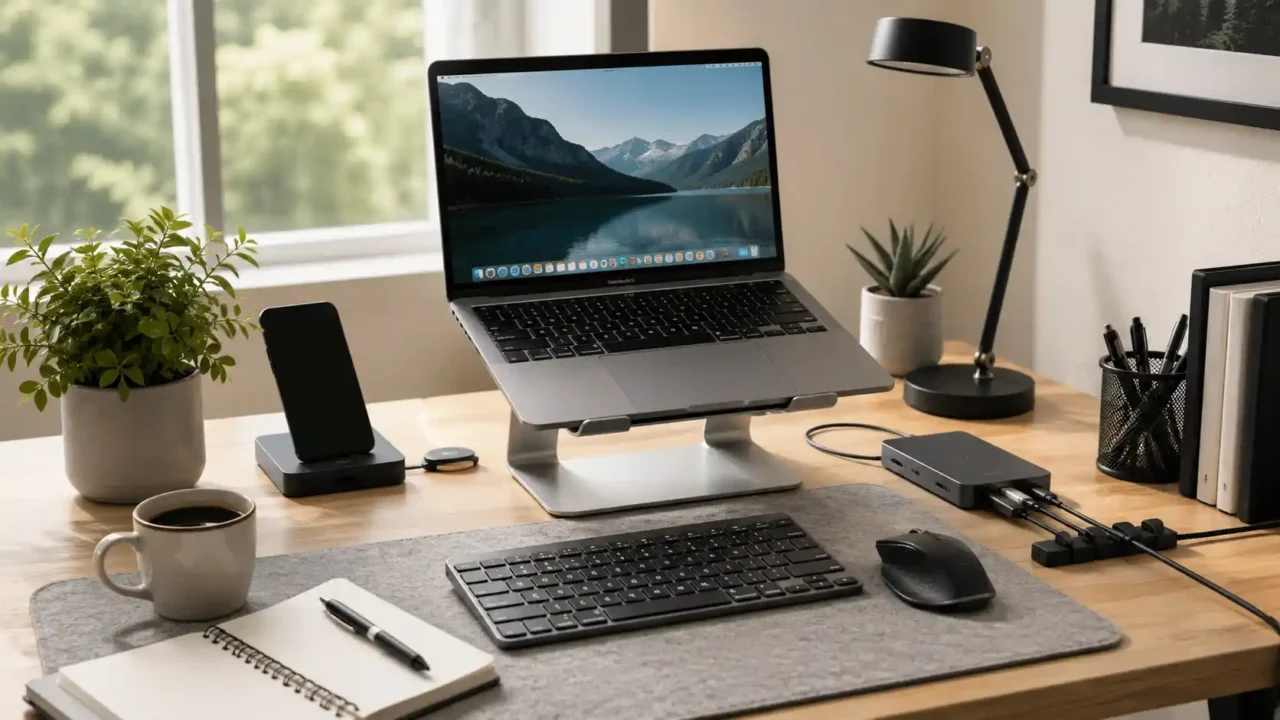
The right laptop accessories for desk setup comfort can make daily work feel easier, cleaner, and less frustrating.
A laptop is convenient because you can move it anywhere. But when you use it for long hours at a desk, the same convenience can become uncomfortable. The screen may sit too low, the keyboard may feel cramped, the touchpad may slow you down, and cables can quickly take over the workspace.
A better desk setup does not need to be expensive or complicated. A few practical accessories can improve posture, reduce clutter, support focus, and make your laptop easier to use every day.
This guide explains the laptop accessories for desk setup comfort that are most worth considering before you buy.
Why laptop accessories matter for desk comfort
A laptop by itself is not always ideal for long desk sessions.
The screen and keyboard are connected, which means you often have to choose between a comfortable viewing height and a comfortable typing position. If the screen is high enough, the keyboard may be too high. If the keyboard feels comfortable, the screen may be too low.
That is why laptop accessories for desk setup comfort often focus on separation: raising the screen, improving typing, improving mouse control, and organizing the workspace.
Ergonomics is about preventing discomfort and injuries at work, according to NIOSH, which makes a practical desk setup more than just an aesthetic upgrade.
1. A laptop stand
A laptop stand is one of the easiest upgrades for a desk setup.
It raises the laptop screen so you do not have to look down as much. This can make the desk feel more comfortable, especially if you work for long sessions or use your laptop as your main computer.
When choosing a laptop stand, check:
- Height adjustment
- Stability
- Ventilation
- Foldable design
- Material quality
- Desk footprint
- Compatibility with your laptop size
A fixed stand can work well if you always use the same desk. A foldable stand may be better if you move between rooms, travel, or work in different places.
For most people, a laptop stand is one of the most useful laptop accessories for desk setup comfort because it changes the whole viewing position.
2. An external keyboard
Once you raise your laptop, you usually need an external keyboard.
Typing directly on a raised laptop can feel awkward. An external keyboard lets you place your hands lower and keep the screen higher. That combination is more comfortable for many desk setups.
Before buying, think about:
- Full-size or compact layout
- Wireless or wired connection
- Key travel
- Noise level
- Battery life
- Compatibility with your laptop
- Whether you need a number pad
A compact keyboard can save space, while a full-size keyboard may be better if you work with spreadsheets or numbers often.
The best keyboard is not always the most stylish one. It is the one that feels comfortable after an hour, not just after five minutes.
3. A comfortable mouse
A mouse can make laptop work faster and more precise.
A touchpad is fine for short tasks, but it can become tiring for editing documents, managing spreadsheets, browsing many tabs, designing, or doing detailed work. A good mouse gives your hand a more natural control point and can improve daily workflow.
When comparing options, check:
- Shape and size
- Grip style
- Wireless or wired connection
- Scroll wheel quality
- Side buttons
- Battery life
- Surface compatibility
Some people prefer a small travel mouse. Others do better with a larger ergonomic mouse. The best choice depends on your hand size, desk space, and how many hours you use it.
A mouse is one of the simplest laptop accessories for desk setup productivity because it can immediately reduce touchpad frustration.
4. A USB-C hub or docking station
Modern laptops are slim, but that often means fewer ports.
A USB-C hub or docking station can help connect monitors, memory cards, USB drives, keyboards, mice, Ethernet cables, and other accessories. This is especially useful if your laptop has only a few ports.
A basic hub may be enough for light use. A docking station may be better if you connect multiple monitors or want a more permanent desktop setup.
Before buying, check:
- Your laptop port type
- HDMI or DisplayPort needs
- USB-A ports
- USB-C charging pass-through
- Ethernet
- SD card reader
- Monitor resolution support
- Power delivery rating
Do not buy a hub only because it has many ports. Buy the one that supports the devices you actually use.
Good connectivity can turn a laptop into a cleaner workstation without replacing the laptop itself.
5. Cable management tools
Cables can make even a good desk feel messy.
Chargers, monitor cables, USB cables, phone chargers, headphones, lamps, and hubs can quickly create clutter. Cable management tools help keep the desk cleaner and make it easier to unplug or move devices when needed.
Useful cable tools include:
- Cable clips
- Velcro ties
- Cable sleeves
- Under-desk trays
- Charger holders
- Desk grommets
- Label tags
Cable management is not only about appearance. It also helps you avoid tangled cords, lost chargers, and awkward cable pulling.
For a clean workspace, cable tools are practical laptop accessories for desk setup organization.
6. Better lighting
Good lighting can change how a desk feels.
A laptop screen in a dark room can feel harsh, while poor lighting can make reading, writing, and video calls less comfortable. A simple desk lamp or monitor light can make the workspace easier to use.
When choosing lighting, check:
- Brightness levels
- Adjustable angle
- Color temperature
- Desk space
- Glare control
- USB or wall power
- Dimming options
Warm light can feel calmer in the evening. Cooler light may feel better for focused daytime work. Adjustable lighting gives you more flexibility.
If you take video calls, lighting also affects how you appear on camera. A small lamp placed well can look better than a strong overhead light.
7. A desk mat or wrist-friendly surface
A desk mat can make your workspace feel more organized and comfortable.
It creates a defined work area for your keyboard and mouse, protects the desk surface, and can make mouse movement smoother. It also helps reduce the scattered feeling that happens when accessories are spread across the desk.
When buying a desk mat, check:
- Size
- Surface texture
- Mouse tracking
- Easy cleaning
- Edge stitching
- Thickness
- Material
Some people also use a wrist rest, but comfort depends on how it is used. A wrist rest should support short pauses, not force your wrists into an awkward position all day.
A simple desk mat is often one of the most overlooked laptop accessories for desk setup comfort.
Other helpful laptop accessories
After the basics, a few extra accessories may be useful depending on your routine.
You may want:
- External monitor
- Webcam
- Microphone
- Headphones
- Monitor riser
- Phone stand
- Notebook holder
- Portable SSD
- Desk organizer
- Cooling pad
Do not buy all of them at once. Start with the accessories that solve your biggest daily problem.
If your neck feels strained, start with a stand. If typing feels cramped, start with a keyboard. If your desk is messy, start with cable management. If calls look bad, start with lighting or a webcam.
The best laptop accessories for desk setup improvement are the ones that solve a real problem first. The same practical approach works when choosing phone accessories before your next smartphone upgrade.
How to choose accessories for a small desk
A small desk needs smarter buying decisions.
You may not have room for a large monitor, full-size keyboard, big speakers, docking station, and wide desk mat. That does not mean your setup cannot be comfortable. It just means every item needs to earn its place.
For small desks, look for:
- Foldable laptop stands
- Compact keyboards
- Vertical laptop stands
- Slim desk lamps
- Small USB hubs
- Under-desk cable trays
- Stackable storage
- Minimal desk organizers
Measure your desk before buying large items. Also think about where each accessory will sit when you are not using it.
For small workspaces, laptop accessories for desk setup comfort should improve the desk without making it feel crowded.
You can also compare this with a more comfortable home setup if your desk is part of a larger home office routine.
What to avoid buying first
Some accessories look useful but may not be necessary right away.
Large docking stations, expensive webcams, premium mechanical keyboards, big monitor arms, and complex lighting setups can be useful for some people. But if you are still figuring out your routine, they may be too much too soon.
Avoid buying based only on:
- Aesthetic desk photos
- Viral setup videos
- Huge discounts
- Features you do not understand
- Gear made for someone else’s workflow
- Products that do not fit your desk
If the accessory is discounted, it still helps to check whether the deal is actually useful before buying. A practical desk setup should match your work, not someone else’s perfect photo.
Before buying more laptop accessories for desk setup upgrades, fix the most uncomfortable part first.
How much should you spend?
You can improve a laptop desk setup without buying everything at once.
A simple first upgrade might be a laptop stand, keyboard, and mouse. That alone can change the way the desk feels. Later, you can add lighting, cable tools, a hub, and storage.
Before spending more, ask:
- Does this solve a daily problem?
- Will I use it every workday?
- Does it fit my desk?
- Does it work with my laptop?
- Can I store it easily?
- Is there a simpler option?
A good setup grows slowly. You do not need to build the perfect desk in one order.
The smartest laptop accessories for desk setup comfort are usually the ones you notice every day because they make work easier.
Final thoughts
A laptop accessories for desk setup plan should start with comfort, not decoration.
Begin with the basics: raise the screen, improve typing, use a better mouse, organize cables, and adjust lighting. Then add extra tools only when they solve a real workflow problem.
A better desk setup does not need to look expensive. It needs to feel easier to use.
If you choose the right laptop accessories for desk setup comfort, your workspace can become cleaner, more practical, and more comfortable without replacing your laptop.