A wireless charging station for desk setup can make your workspace cleaner, but only if it fits the devices, cables, outlets, and habits you already have. A good charging station should reduce clutter, not create a new mess of adapters, blinking lights, and awkward angles.
A desk charger is different from a travel charger. A wireless charging station for desk setup should feel like part of the workspace, not a loose gadget sitting beside it. It sits in one place, often near a laptop, monitor, lamp, keyboard, mouse, notebook, and maybe a tablet or earbuds case.
That means the best choice is not only about charging speed. It is about layout, safety, compatibility, stability, and how naturally it fits into your daily routine.
Start With the Devices You Charge Every Day
Before buying a wireless charging station for desk setup, list the devices you actually charge at your desk. That may include a phone, wireless earbuds, smartwatch, tablet, or second phone. Then separate daily devices from occasional devices.
A 3-in-1 charger looks useful, but it may be unnecessary if you only charge a phone at your desk. A larger stand may also waste space if your earbuds and watch charge overnight somewhere else.
On the other hand, if your desk is already full of loose charging cables, a multi-device stand can be a real upgrade. The goal is simple: choose the number of charging zones based on your real routine.
Check Phone Compatibility First
A wireless charging station for desk setup should match your phone, not just look modern. Check whether your phone supports wireless charging, magnetic alignment, or a specific charging profile. Some phones charge wirelessly at different speeds depending on the charger, adapter, case, and alignment.
If you use a thick case, wallet case, metal ring, or magnetic accessory, confirm that it works with wireless charging. A charger that works perfectly with a bare phone may become unreliable with the case you use every day.
For broader accessory planning, our guide to best phone accessories before your next smartphone upgrade can help you think beyond the charger alone.
Think About Desk Angle and Visibility
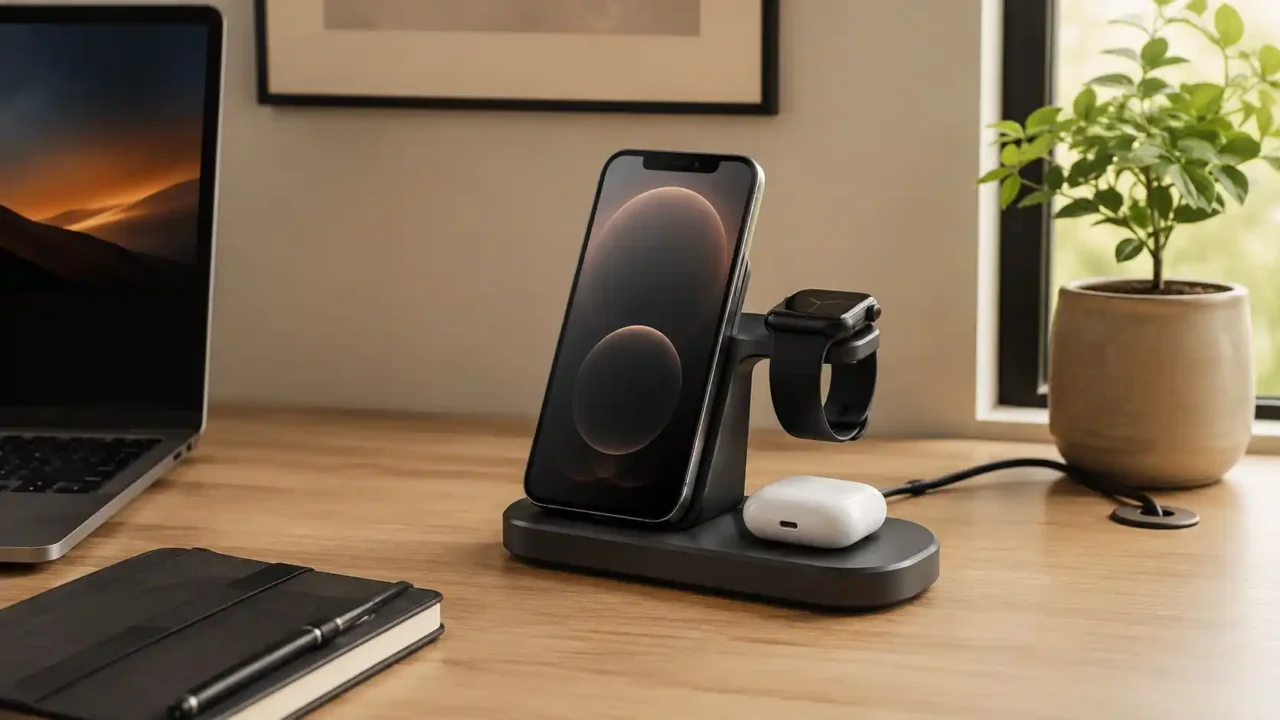
A flat pad is simple, but it makes the phone harder to see while working. A stand-style wireless charging station for desk setup can hold your phone upright, which is useful for notifications, calls, timers, calendar checks, and video meetings.
Angle matters. A stand that leans too far back may reflect light from a window. A stand that sits too upright may feel unstable.
If you use your phone while it charges, choose a design that keeps the screen visible without forcing you to pick it up constantly. For many desks, a vertical stand is more useful than a flat pad because it combines charging with phone visibility.
Measure the Footprint Before You Buy
A wireless charging station for desk setup should not steal the space you need for working. Measure the area near your monitor, laptop, lamp, or keyboard before choosing a model. Look at width, depth, and cable exit direction.
Some chargers look compact from the front but need extra room behind them for a USB-C cable. Others have a wide base that blocks notebooks, pens, or a mouse pad.
If your desk is narrow, a vertical charger may save more room than a flat multi-device mat. If your desk already feels crowded, read our guide to home office accessories that make your desk more comfortable before adding another device.
Choose a Stable Base
Stability is more important than it looks. A wireless charging station for desk setup should stay steady when you place or remove your phone. If the base slides, the phone may lose alignment or fall forward.
Look for a weighted base, rubber feet, and a design that supports the phone properly. If the charger holds multiple devices, make sure it does not tip when only one device is attached.
This matters especially for magnetic charging stands that hold the phone in the air. A charger that wobbles every time you touch it will quickly become annoying. A wireless charging station for desk setup should feel stable enough that you trust it during a busy workday.
Check the Power Adapter Requirement
Many chargers do not include the wall adapter. A wireless charging station for desk setup may need a specific USB-C power delivery adapter to support full speed across all devices.
If you use an old low-power adapter, the charging station may work slowly or fail to charge multiple devices at once. Check the required wattage before buying. Then check whether the adapter is included.
If it is not included, add the cost of a compatible adapter to the real purchase price. This is also where deal quality matters. If a discount looks too good to trust, our guide to how to spot a useful online deal can help you slow down before buying.
Watch for Heat and Airflow
Wireless charging naturally creates some heat, but excessive heat is a warning sign. A wireless charging station for desk setup should have enough airflow around it and should not be buried under papers, fabric, notebooks, or other desk clutter.
Avoid placing the charger in direct sun or next to another warm device. If your phone feels unusually hot, remove it and check the charger, adapter, case, and product guidance.
Before buying any charging accessory, it is also smart to check CPSC recalls and product safety warnings for charger-related issues. Heat is one reason to avoid suspiciously cheap charging accessories from unknown sellers.
Look for Cable Management
A clean desk charger should make the desk cleaner. A wireless charging station for desk setup should route the cable neatly toward the back of the desk, a cable tray, or a safe outlet.
If the cable exits from the wrong side, the setup may look messy even if the charger itself is compact. Check cable length. A short cable may force the charger into an awkward position.
A very long cable may create extra clutter unless you use clips or a cable sleeve. Our guide to laptop accessories for desk setup can help you plan the charger as part of the whole workspace, not as a separate object.
Decide Whether You Need Multi-Device Charging
A multi-device wireless charging station for desk setup is useful if you charge several devices in the same place. It can reduce cable clutter and make your desk easier to reset at the end of the day.
But multi-device chargers can also be larger, more expensive, and more dependent on the correct power adapter. If you only need phone charging, a single stand may be cleaner.
If you charge a phone, earbuds, and watch every day, a 3-in-1 design may be worth it. The best choice depends on your daily device flow, not the number of charging spots advertised.
Avoid Overbuying Charging Speed
Charging speed is important, but it should not be the only buying reason. A wireless charging station for desk setup is often used while you work, so the phone may sit there for hours.
In that case, a stable and reliable charger may matter more than the fastest possible speed. Fast charging also depends on phone support, charger certification, case thickness, adapter power, and temperature.
If one piece of the chain is weak, the advertised speed may not happen in real life. Choose a charger that balances speed with reliability, desk fit, and safe everyday use.
Think About Travel Separately
A desk charger does not need to solve travel charging. A wireless charging station for desk setup can stay at home or in the office, while a portable power bank handles flights, hotels, and commuting.
Trying to make one charger do everything can lead to compromises. A foldable travel charger may not feel stable enough for daily desk use. A heavy desk stand may be annoying to pack.
If you travel often, our portable power bank for travel and daily use guide can help you separate desk charging from mobile charging. A dedicated desk setup and a dedicated travel setup are often cleaner than one awkward all-purpose solution.
Check Indicator Lights
Small lights can be helpful, but bright lights can be distracting in a bedroom office or late-night workspace. A wireless charging station for desk setup should show charging status without turning your desk into a blinking display.
Look for subtle indicator lights or lights that turn off after a few seconds. Avoid chargers with large bright LEDs if your desk is near your bed or if you work in low light.
The best desk accessories quietly support your routine instead of demanding attention.
Read Reviews for Alignment Issues
Wireless charging depends on alignment. A charger can look good in photos but fail if the phone must be placed in one exact spot. Read reviews for comments about missed charging, overnight charging failures, phone slipping, heat, and case compatibility.
A wireless charging station for desk setup should be forgiving enough for daily use. If many buyers mention that they have to reposition the phone repeatedly, that is a warning sign.
Good alignment is especially important if you want to place the phone down quickly during a busy workday.
Final Thoughts
A wireless charging station for desk setup should make your workspace calmer, cleaner, and easier to use. Start with the devices you charge every day, confirm compatibility, measure the footprint, check the adapter requirement, and think about heat, cable routing, and stability.
The best wireless charging station for desk setup is not the flashiest model. It is the one that fits your desk, works with your devices, keeps cables under control, and charges reliably without adding friction.
Choose a wireless charging station for desk setup that supports the way you already work, and your desk will feel more organized every time you sit down.