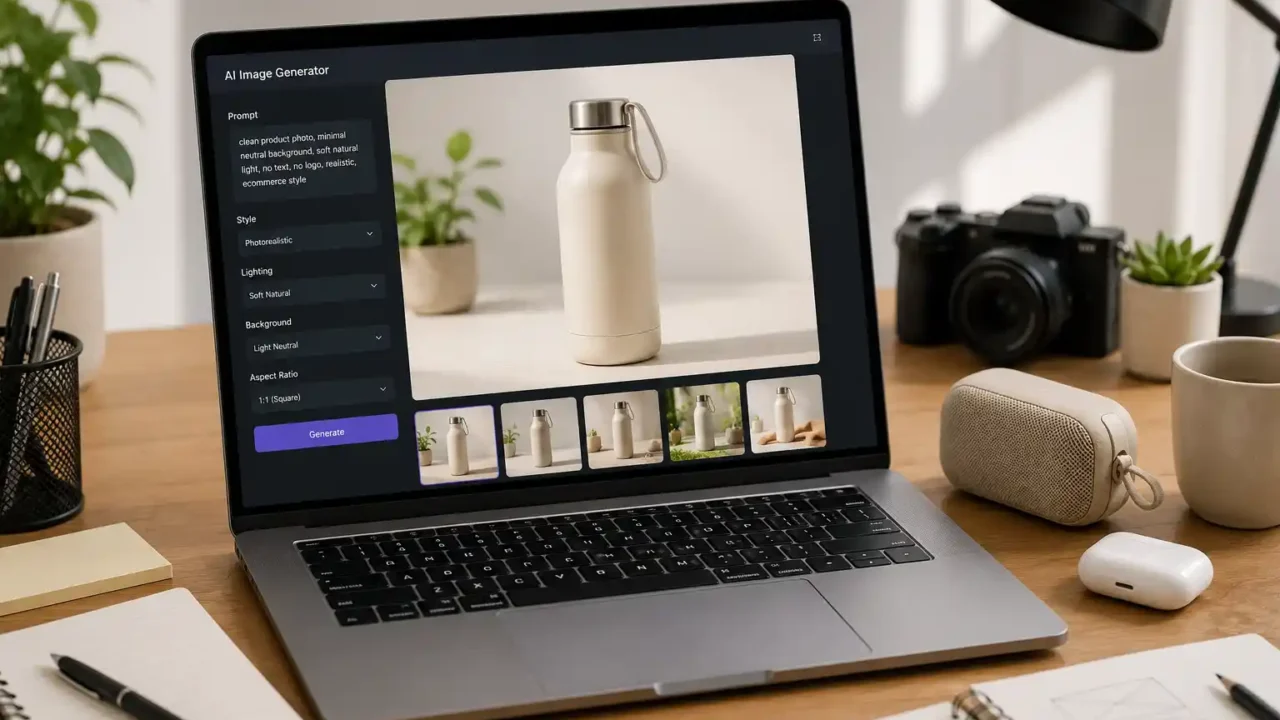
An AI image generator for product photos can help you create cleaner visuals for blog posts, product roundups, ads, landing pages, social posts, and online store content. But it only works well if the images still look realistic, honest, and useful for the buyer.
Product photos are not just decoration. They affect trust. If the image looks fake, confusing, over-edited, or different from what the product actually is, it can hurt the page instead of helping it.
That is why choosing an AI image generator for product photos should not be based only on how beautiful the demo images look. You need to check realism, editing control, commercial rights, consistency, export quality, background options, and whether the image can support a real buying guide without misleading the reader.
Start With the Type of Product Image You Need
Before choosing an AI image generator for product photos, decide what kind of image you actually need. Not every tool is good at the same job.
Some tools are better for clean studio-style product images. Others are better for lifestyle scenes, social media visuals, background replacement, mockups, or ad creatives.
For a buying guide, you may need a simple image that shows the product clearly. For a social post, you may want something more emotional or lifestyle-focused. For an ecommerce-style page, you may need a clean product composition with a neutral background.
The best AI image generator for product photos is the one that fits your content format, not the one with the flashiest examples.
Realism Matters More Than Creativity
Creative images can look impressive, but product content needs trust. If a product image looks too artificial, the reader may question the whole article.
A good AI image generator for product photos should create realistic lighting, natural shadows, believable textures, and normal proportions. This matters especially for fashion accessories, home products, beauty tools, tech accessories, bags, organizers, and small household items.
Watch for common AI problems:
- distorted handles
- unrealistic buttons
- fake brand logos
- strange zippers
- incorrect reflections
- extra product parts
- unreadable packaging
- hands or fingers that look unnatural
- objects that do not match the product category
If the image looks beautiful but physically impossible, it is not a good product photo. It may work as concept art, but not as a buying guide image.
Check Whether the Tool Can Follow Detailed Prompts
An AI image generator for product photos should understand detailed instructions. If you ask for a neutral background, no logos, no text, clean lighting, and a realistic product composition, the output should follow that direction.
Prompt control matters because product visuals need consistency. If every image has a different style, angle, color tone, or background, your website may look messy.
A strong tool should allow you to control:
- background style
- lighting
- camera angle
- product placement
- number of objects
- mood
- aspect ratio
- color palette
- level of realism
- whether text or logos should be excluded
For example, if you are creating images for a shopping guide, the tool should understand a clean editorial ecommerce-style composition. If you are building a desk setup article, it should understand workspace context. Our laptop accessories for desk setup guide is a good example of a topic where clean, realistic product-style visuals matter more than fantasy effects.
Avoid Fake Branding and Misleading Details
One of the biggest risks with an AI image generator for product photos is accidental fake branding. The tool may create invented logos, fake labels, fake certification marks, or packaging that looks like a real brand.
That can create problems if the image appears to represent a specific product that does not actually exist. It can also confuse the reader if the article is a general buying guide.
For broad AdSense-friendly content, it is usually safer to use no visible brand logos, no readable packaging claims, and no fake product names. A generic product-style image can support the article without pretending to show a specific item.
This is especially important if you later add affiliate links. The image should not imply that a product has features, certifications, results, or accessories that the actual product does not have.
Use AI Images as Editorial Support, Not Proof
An AI image generator for product photos can create helpful visuals, but the image should not replace real product verification.
If you are reviewing a specific item, a real product photo is usually better. If you are writing a general buying guide, an AI image can work as an editorial illustration as long as it does not claim to show an exact product.
The Federal Trade Commission’s Advertising and Marketing Basics guidance says advertising claims should be truthful, not deceptive or unfair, and evidence-based. That is a useful reminder when using AI-generated product visuals: the image should support the content, not exaggerate what a product can do.
A good AI image generator for product photos should help make the page easier to understand. It should not make the product look larger, stronger, safer, more luxurious, or more effective than the real buying advice supports.
Check Commercial Usage Rights
Before using an AI image generator for product photos on a public website, check the usage rights. Some tools allow commercial use. Others limit use depending on the plan, license, model, or source assets.
Do not assume that every generated image is safe for a monetized website. Read the tool’s terms for commercial publishing, advertising, affiliate content, and resale.
This matters for a site that may use AdSense, affiliate links, sponsored content, or product roundups. If the image will appear on a monetized page, the usage rights should be clear.
A practical AI image generator for product photos should make commercial use easy to understand. If the terms are vague, confusing, or hidden, that is a warning sign.
Look for Consistent Style Across Articles
A website looks more professional when images feel consistent. If every article has a completely different visual style, the site can look random.
An AI image generator for product photos should help you create a repeatable style. For Top Deal Discoveries, that may mean clean editorial product photography, neutral backgrounds, soft natural light, no logos, no text, realistic props, and a premium but simple composition.
Consistency is important for category pages too. If the Tech category uses clean desk images, the Fashion & Accessories category uses neutral product flat lays, and the Home & Lifestyle category uses warm lifestyle scenes, the site starts to feel intentional.
The best AI image generator for product photos should help build that visual identity, not reset it with every prompt.
Check Export Quality and Image Size
Image quality matters for both user experience and website speed. A large, beautiful image can still be a problem if it slows the page.
When choosing an AI image generator for product photos, check export resolution, file format, compression options, and whether the image can be converted cleanly to WebP.
For WordPress articles, you usually want a featured image that looks sharp but is not unnecessarily heavy. Very large files can slow loading, especially on mobile.
A good workflow is to generate the image, crop it for the article layout, compress it, convert it to WebP, and add descriptive alt text.
If the tool exports blurry or overly compressed images, it may not be ideal for featured images. If it exports huge files, you need an optimization step before upload.
Avoid Text Inside the Image
For most product guide featured images, avoid text inside the image. AI tools often create strange letters, misspelled words, broken labels, or fake packaging.
A clean AI image generator for product photos should allow you to request no text, no labels, and no logos. This makes the image safer and more versatile.
Text also creates problems for localization, accessibility, and future updates. If the article title changes, the image may become outdated. If the image contains fake product claims, it can reduce trust.
Use the article title, headings, and caption for words. Let the image show the product environment.
Background Replacement Can Be More Useful Than Full Generation
Sometimes you do not need a fully AI-generated image. You may only need background replacement, cleanup, shadow improvement, or object placement.
An AI image generator for product photos can be useful if it lets you upload or edit an image instead of generating everything from scratch. This is especially helpful when you already have a product photo but the background looks messy.
For example, you might remove clutter, place the product on a clean desk, create a neutral studio background, or improve lighting while keeping the product itself accurate.
This can be safer than creating a completely imaginary product, especially for affiliate content or product-specific pages.
Check If the Tool Handles Your Product Category Well
Some AI tools are better with certain product types than others. A tool may create beautiful home decor images but struggle with tech accessories. Another may handle bags and fashion well but fail with beauty tools or small electronics.
Before committing to an AI image generator for product photos, test it with the categories you publish most often.
For a broad shopping site, test:
- bags
- organizers
- desk accessories
- beauty tools
- small kitchen items
- travel accessories
- phone accessories
- kids room products
- home organization items
- fitness accessories
If the tool struggles with the products you actually write about, it may waste time.
For product buying guides, the visual should make the topic clearer. Our best phone accessories before your next smartphone upgrade guide is an example where accurate accessory-style visuals can help readers understand the buying context.
Think About Trust for AdSense Readiness
For an AdSense-friendly website, images should support useful content. They should not make the page look spammy, exaggerated, or low-quality.
An AI image generator for product photos can help create a cleaner site, but overusing obvious AI images can have the opposite effect. If every image looks plastic, fake, or unrelated to the article, the site may feel thin.
The safest approach is to use realistic, simple images that match the article topic. A clean product scene is better than an overdramatic image with glowing effects, fake labels, and impossible details.
The image should help the reader understand the guide. It should not distract from the buying advice.
Compare Time Saved With Editing Time
AI images can save time, but only if the output needs minimal correction. If you spend too long fixing every image, changing prompts, removing fake text, or regenerating details, the workflow may not be efficient.
A practical AI image generator for product photos should produce usable results in a small number of attempts. The tool should help you move faster, not trap you in endless prompt editing.
Before choosing a tool, test how many attempts it takes to get one usable featured image. Also check whether the tool lets you reuse prompt templates. A saved prompt style can make future articles faster and more consistent.
If you publish many articles, repeatability matters more than one impressive image.
Check Editing Features
A full-featured AI image generator for product photos may include editing tools such as object removal, background change, inpainting, outpainting, lighting adjustment, upscaling, and image variation.
These features are useful because the first generation is not always perfect. You may need to remove a fake logo, clean a background, adjust an object, or create a wider image for a featured image crop.
The most useful editing features are:
- remove object
- replace background
- extend canvas
- upscale image
- generate variations
- remove text
- adjust lighting
- change aspect ratio
If a tool only generates images but does not allow practical edits, it may be less useful for a publishing workflow.
Keep Product Images Honest
A good product image should not promise something the article does not support. If you create a product photo for a travel bag, do not show impossible storage capacity. If you create a beauty tool image, do not imply medical results. If you create a desk accessory image, do not show features the product category does not normally have.
This is where an AI image generator for product photos needs human review. The tool may create a beautiful image, but you still need to decide whether it is honest, useful, and aligned with the article.
For deal-focused content, this is also important. A polished image should not make a weak product look premium beyond reason. Our how to spot a useful online deal before you buy guide is a good reminder that the visual presentation should not replace careful buying judgment.
Build a Reusable Prompt Template
The easiest way to get consistent results from an AI image generator for product photos is to build a reusable prompt structure.
A strong prompt can include:
- product type
- background
- lighting
- camera angle
- style
- props
- brand restrictions
- text restrictions
- logo restrictions
- mood
- aspect ratio
For example, a useful format might be: clean editorial ecommerce-style photo, realistic product, neutral background, soft natural light, no text, no labels, no logos, no hands, premium but realistic composition.
Once you find a prompt style that works, reuse it across similar articles. This keeps the website visually consistent and reduces wasted time.
Final Thoughts
An AI image generator for product photos can be a valuable tool for websites, buying guides, affiliate content, and AdSense-ready articles. But the image must still be realistic, clear, honest, and useful.
Before choosing a tool, check realism, prompt control, commercial rights, export quality, editing features, background options, and whether the tool can create consistent images across your content categories.
The best AI image generator for product photos is not the one that creates the most dramatic image. It is the one that helps you publish clean, trustworthy visuals that support the article and make the buying guide easier to understand.
Choose an AI image generator for product photos that saves time without reducing trust.
A realistic AI image generator for product photos can improve your publishing workflow when it creates visuals that look clean, useful, and honest.